Appearance
Caller Rules
WebWorkstationUse Admin > ZynoTalk > Caller Rules to steer or block incoming calls based on the caller's phone number.
Admin Access Required
Only ZynoTalk administrators should create or edit caller rules.
Current ZynoTalk Platform
This screen appears only for organizations using the current ZynoTalk calling platform. If you do not see it, your organization may be on a legacy voice setup or the feature may not be enabled.
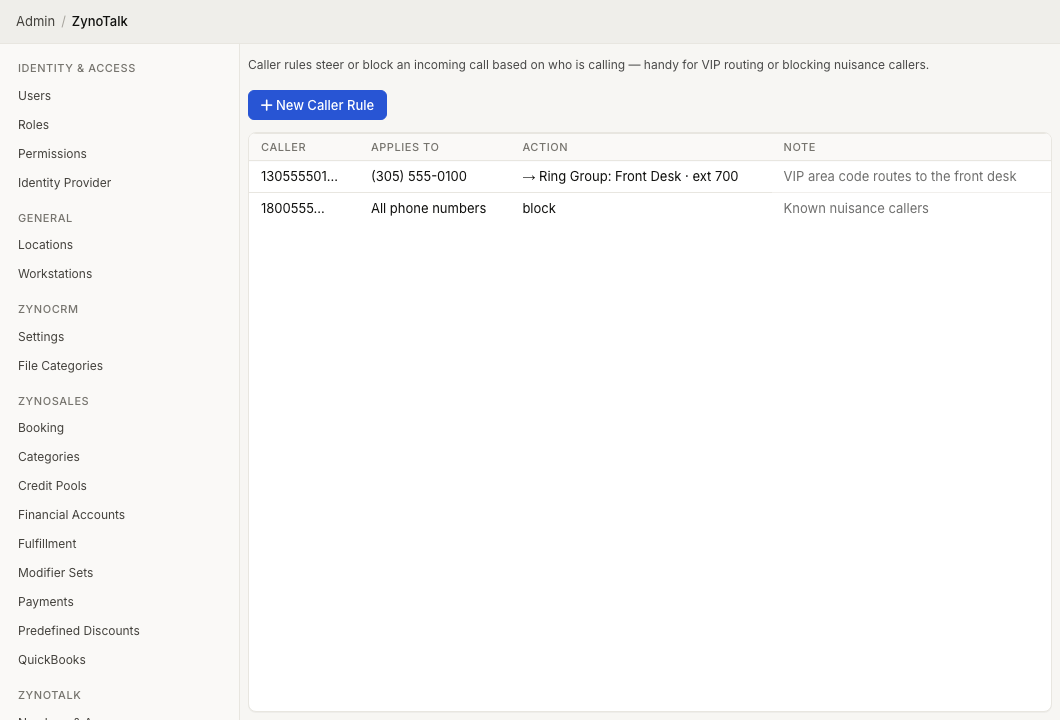
Page Layout
The Caller Rules table shows:
- Caller
- Applies To
- Action
- Note
Select a rule to edit it. Open the row context menu to edit or delete a rule.
Create A Caller Rule
- Open Admin > ZynoTalk > Caller Rules.
- Select New Caller Rule.
- Enter the caller digits in Caller.
- Choose whether the rule applies to All phone numbers or one specific number.
- Choose the action in Then.
- If the action routes the call, choose the destination type and destination.
- Add an optional Note.
- Select Create.
Caller Matching
The Caller field matches the beginning of a 10-digit caller number:
| Digits | Match |
|---|---|
| 3 digits | An area code. |
| 6 digits | An area code and exchange. |
| 10 digits | One exact caller. |
| Any other 1-10 digit prefix | Any caller whose number starts with those digits. |
Actions
| Action | Result |
|---|---|
| Route to a destination | Sends the caller to a ZynoTalk destination. |
| Play a busy signal | Gives the caller a busy signal. |
| Block the caller | Declines the call. |
Routing destinations use the same destination types as telephone number routing: Call Flow, Ring Group, AI Agent, Parking Lot, Extension, or Voicemail.
Common Issues
| Problem | What To Check |
|---|---|
| A rule matches too many callers | Use more digits in the caller prefix. |
| A rule does not match | Confirm the caller number starts with the digits you entered. |
| A destination is missing | Create the destination first, then edit the rule. |
| A rule affects every number | Set Applies to to a specific number instead of all phone numbers. |